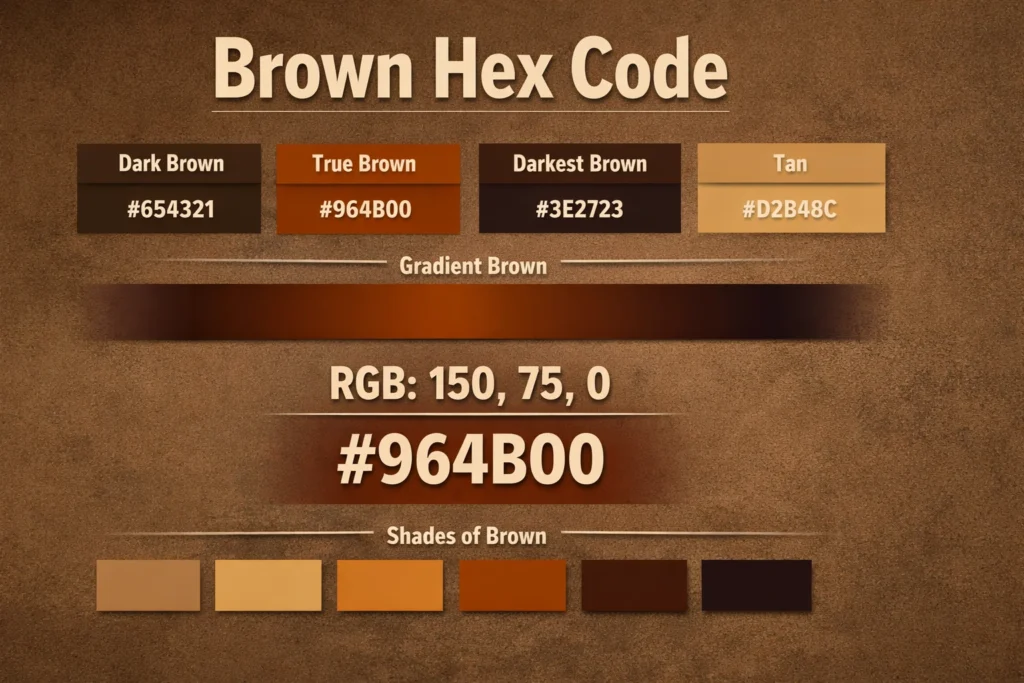
The brown hex code is widely used in web design, UI design, branding, and digital illustration. Brown represents warmth, stability, and natural balance, which is why designers often use it for backgrounds, typography, and accent elements.
Brown does not exist as a single fixed value. Instead, it appears in multiple shades, ranging from light tan to deep dark brown. Each variation uses different HEX and RGB values based on brightness and saturation.
If you want to explore or generate accurate brown color values, you can use the
Brown Color Hex Code tool by OmniTools.
Quick Answer
Brown hex codes vary by shade. Dark brown, true brown, tan, and gradient brown all use different HEX and RGB values depending on how light or dark the color appears.
What’s the Hex Code for Dark Brown?
Short Answer
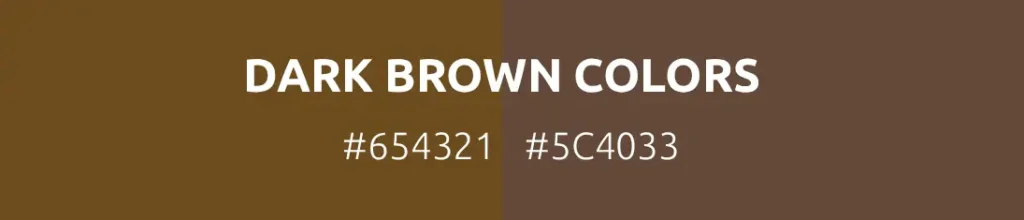
Common hex codes for dark brown include #654321 and #5C4033, depending on how deep the shade needs to be.
Explanation (Why + How)
Dark brown is created by lowering brightness while maintaining warm red and yellow undertones. In digital color systems such as HEX and RGB, this means reducing overall lightness without shifting the color toward gray or black.
Design tools like Adobe Photoshop, Figma, and CSS color models classify dark brown as a warm neutral with low luminance.
Example / Numbers
Dark Brown HEX: #654321
RGB: rgb(101, 67, 33)
Quick Summary
Dark brown uses low brightness with warm undertones.
What Color Is Gradient Brown?
Short Answer
Gradient brown is a blend of two or more brown shades rather than a single color value.
Explanation (Why + How)
Gradient brown is commonly used in modern UI and web design to add depth and visual interest. Designers create gradient brown by transitioning between light and dark brown tones using CSS gradients or design tools.
This approach is widely used in CSS linear-gradient properties and digital design platforms.
Example / Numbers
Example CSS gradient:
linear-gradient(#8B4513, #5C4033)

Quick Summary
Gradient brown blends multiple brown shades smoothly.
What Is the Hex Code for True Brown?
Short Answer
The hex code most commonly associated with true brown is #964B00.
Explanation (Why + How)
True brown balances red and green values with very little blue. In RGB-based color systems, this balance produces a natural brown tone without appearing orange or gray.
This value appears frequently in color references and design systems.
Example / Numbers
True Brown HEX: #964B00
RGB: rgb(150, 75, 0)
Quick Summary
True brown uses strong red and green with minimal blue.
Which Is the Darkest Shade of Brown?
Short Answer
One of the darkest commonly used brown shades is #3E2723.
Explanation (Why + How)
The darkest browns approach black while maintaining subtle warmth. Designers often choose very dark brown instead of pure black to soften contrast and reduce visual harshness.
This approach is common in UI design and typography.
Example / Numbers
Very Dark Brown HEX: #3E2723
RGB: rgb(62, 39, 35)
Quick Summary
Darkest browns stay warm while nearing black.
How to Do Brown with RGB?
Short Answer
Brown is created in RGB by combining high red values, moderate green values, and low blue values.
Explanation (Why + How)
In RGB color theory, brown is essentially a darker version of orange. Red dominates, green supports warmth, and blue remains minimal to avoid purple or gray tones.
This method is used across web design, digital illustration, and CSS styling.
Example / Numbers
RGB Brown: rgb(150, 75, 0)
Dark Brown RGB: rgb(101, 67, 33)
Quick Summary
Brown in RGB uses red dominance with reduced blue.
What Is the Darker Shade of Brown?
Short Answer
Darker shades of brown include #5C4033, #4E342E, and #3E2723.
Explanation (Why + How)
Darker brown shades reduce brightness while keeping warm undertones. These colors work well for text, borders, and contrast-heavy elements where black feels too strong.
Example / Numbers
Deep Brown: #4E342E
Espresso Brown: #3E2723
Quick Summary
Darker browns provide contrast without harshness.
What Is the Color Code for Tan?
Short Answer
A commonly used hex code for tan is #D2B48C.
Explanation (Why + How)
Tan is a light brown shade with higher brightness and lower contrast. It appears frequently in background designs, neutral layouts, and natural color palettes.
Tan is also a named color in CSS standards.
Example / Numbers
Tan HEX: #D2B48C
RGB: rgb(210, 180, 140)
Quick Summary
Tan is a light, warm brown.
What Are the Shades of Brown?
Short Answer
Brown shades range from light tan to very dark espresso brown.
Explanation (Why + How)
Shades of brown are created by adjusting brightness and saturation while keeping warm undertones intact. Designers choose different shades depending on mood, contrast, and usability.
Example / Numbers
- Light Brown: #C4A484
- Tan: #D2B48C
- Saddle Brown: #8B4513
- True Brown: #964B00
- Dark Brown: #5C4033
- Very Dark Brown: #3E2723
Quick Summary
Brown shades vary from light neutrals to deep dark tones.
What Color Is #964B00?
Short Answer
The hex code #964B00 represents a classic true brown.
Explanation (Why + How)
This color combines strong red and green values with minimal blue, resulting in a natural brown tone commonly used in branding and web design.
Example / Numbers
HEX: #964B00
RGB: rgb(150, 75, 0)
Quick Summary
#964B00 is widely recognized as true brown.
Final Thoughts
The brown hex code covers a wide range of shades, from light tan to very dark brown. Understanding how brown works in HEX and RGB helps designers, developers, and creators choose colors accurately and confidently.
For quick conversion and shade exploration, the
OmniTools Brown Color Hex Code Generator offers a practical way to work with brown color values.
Brown may look simple, but selecting the right shade makes a noticeable difference in design clarity and usability.